

Simplex Theme CM10.1 v1.6 Apk Download Free
Requires Android:2.3 and up | 10 MB |
Simplex is a fresh and minimal take on the Android UI for use with the Theme Chooser Engine available in most custom ROMs!
With a cool grey color scheme and subtle hints of light red, this theme is perfect for those looking for an overhaul to the look of your phone. An attention to detail is important, take a look at the screenshots and see for yourself!
IMPORTANT:
Only for use with the Theme Chooser Engine. A custom, rooted ROM with this feature is needed to use this app!!
Supported screen resolutions:
[XHDPI][HDPI]
Supported ROMs:
• CM10.1, AOKP, Paranoid Android
What’s Theme Chooser & how to I apply this theme?
• Theme Chooser is theme engine included in popular custom ROMs such as CM10, AOKP,
and many more.
• Download and install this app and then navigate to Settings -> Themes -> Alloy Theme,
and hit the “APPLY” button.
TROUBLESHOOTING:
• IF you see this error: “THIS THEME WAS IMPROPERLY COMPILED AND CANNOT BE
APPLIED…”, RE-APPLY the default “System” theme AND either:
• REBOOT
• OR, clear cache & data of “ThemesProvider.apk” & “ThemeChooser.apk”, then apply
the theme.
• This error: “SORRY, THIS THEME IS MISSING ASSETS FOR YOUR DEVICES SCREEN SIZE,” is
HARMLESS, just ignore and select “APPLY ANYWAY.”
What’s in this version :
• Google keyboard users, use the stock AOSP keyboard instead!
• Gmail theme updated
• Remove stock lockring
• CM Torch themed
• Removed Play Music theme
• Switch alignment issue (WIP)
• Settings data usage tweaked
• New Halo ring
• MPDI endcall button (WIP)
• Google Calendar check padding
• Genie News themed
• Fixed fastscroll popups
• Removed search widget theme
• Buttons theme tweaked
• CM Quicksettings camera icon added
• Kii Keyboard theme
• Swype Keyboard theme


If you face any problem to download, please inform us by comment .
Here is the link for Download...................
DOWNLOAD>>

System Monitor v1.2.2.2 Apk Download free
Requires Android:4.0 and up | 1.3 MB |
The most beautiful and versatile System Monitor for Android.!!
App Review:
This application provides real time system load statistics in the form of text and graph.This app is a full 5 in 1! You will be able to monitor CPU,RAM,I/O,Network and TOP APPS from
• Main app
• Notification bar
• Floating app
• Widgets, including DashClock extensions
IMPORTANT: Recommended use of notifications:
• 1 Notification : 1 second interval, show expanded
• 2 Notifications: 3 second interval, 1 show expanded
• 3 Notifications: 4 second interval, 1 show expanded
• 4 Notifications: 5 or 6 second interval, 1 or 0 show expanded
You will be able to configure lots of nice features, such as:
• The update interval in order to spare system resources.
• Choose to either monitor total cpu usage or individual cpu cores!
What’s in this version :
Updated:
• Language files
• Slight improvement in the battery algorithm
Fixed:
• Show system processes (FULL Version)
• Some Crashes
• Some text colors on older Android versions
New:
• Option to disable battery history service
• Option for notification priorities (FULL Version)
• Widget performance improvement (FULL Version)


If you face any problem to download, please inform us by comment .
Here is the link for Download...................
DOWNLOAD>>

AndroZip™ Pro File Manager v4.6.5 Apk download Free
Requires Android:2.0 and up | 2 MB |
AndroZip File Manager helps you copy, delete, move, search, and organize your files, music, pictures, and folders just like you would do on your PC.
App review:
AndroZip File Manager helps you copy, delete, move, search, and organize your files, music, pictures, and folders just like you would do on your PC.
With over 4 million downloads and its support of ZIP, encrypted ZIP, RAR, TAR, GZIP, BZIP2, and 7ZIP archive formats, AndroZip File Manager is definitive leader among similar applications on the market.Besides the archive functionality it also lets you send files, e.g. via email.
Optimized specifically for both, phone and tablet displays. Due to many added features like drag and drop functionality, AndroZip File Manager is preferred among tablet users.
Use it also to back up your applications and install new application APK on your phone, and manage phone memory and resources via task manager.
Installs to SD card.
Features:
• Work with archives: ZIP, RAR, 7ZIP (BETA – under development) , GZIP, TAR, BZIP2
• Create ZIP,TAR,GZIP
• File manager (single/multiple)
• Task killer, Search, application manager
• Install apps: APK files
• Short tap and long tap menus
• Send files via mail
What’s in this version:
• Footer with number of folders/files and free/total amount of space
• other fixes
If you face any problem to download, please inform us by comment .
Here is the link for Download...................
DOWNLOAD>>

PDF Max: The #1 PDF Reader! v1.0 Apk Download Free
Requires Android:2.2 and up | 9 MB |
PDF Max is the 5-star rated, full-featured PDF reader used by millions of iPhone/iPad users world-wide and now available for your Android!
◙ App Review:
It was designed for those people who’re looking for a full-featured, touch-based optimization & professional PDF application. It provides all features you need for an everyday PDF app in one place so that you do not need to spend extra money for other apps.
◙ FEATURES:
PROFESSIONAL PDF READER
• TEXT REFLOW: PDF Max includes an Amazing Text Reflow feature that helps you read
your PDF easily with any kind of PDF. Forget the tedious pan & zoom steps, you now
just enjoy reading your documents.
• TEXT TO SPEECH: Don’t keep your eyes on the screen all the time, Let the superb TTS
feature in PDF Max does the work: It read PDF documents for you.
• FAST RENDERING: PDF Max equips a super-fast rendering engine worked smoothly on all
Android Phones/Tablets with Android 2.2 or newer.
• FAST SCROLLING: PDF Max is the best PDF app that allows continuous vertical scroll
through an entire document. You can also set the option to view one page at a time,
it’s your choice.
• SMART ZOOM: Double-tap on text blocks and PDF Max will zoom the touched text block
to fit the screen. Simple & efficient reading.
• UI & NAVIGATE: The Navigation Panel lets you interact with your documents by
thumbnails, bookmarks, annotations, PDF outline, Search or other common actions.
• LARGE PDFs: PDF Max opens large PDFs easily without any problem. The maximum file
size is only depending on the file size supported by the device itself.
FULL-FEATURED PDF ANNOTATOR
• TYPE ON YOUR PDF: PDF Max lets you insert text into your PDF by creating FreeTexts
(a.k.a TypeWriter).
• DRAW WITH YOUR FINGER:Use your finger or a stylus to take handwritten notes or
highlight text in books, whether normal PDF or scanned. Eraser is of course also
included to help you correct and refine your handwriting.
• MARK UP TEXT:Mark important things in books, journals or documents using Highlight,
Underline, Cross-out and Squiggly tools.
• CREATE NOTES AND CONVERSATIONS:Add comments anywhere in the document. PDF
Max even supports thread-conversations to help you collaborate with others like never
before.
• DRAW ANY SHAPE:Draw, position and resize a multitude of shapes, including
Rectangles, Lines, Ovals, Polylines, and Polygons with intelligent snapping.
• MANAGE PDF PAGES, BOOKMARKS:You can reorder pages, insert blank pages and even
delete PDF pages. PDF Max also supports manage PDF Bookmarks.
EASY TO USE AND POWERFUL FILE MANAGER:
Manage your own PDF library or all your PDFs on your devices easily with an intuitive File Management Interface. Dropbox is supported, more storages will be supported in the next updates.


If you face any problem to download, please inform us by comment .
Here is the link for Download...................
DOWNLOAD>>

Bubble Launcher full version v1.81 Apk Download Free
Requires Android:1.6 and up | 702 KB |
Bubble Launcher is an ‘always on top’ side launcher for Android OS!
It can be used on top of every opened app.
The starter halo hotspot is made as floating system window, so it can be on top of everything on screen!
The Launcher comes with a standard listview and circle halo knob
for selecting an starting an app.
Hotspot -> swipe left -> opens Circle Launcher;
Hotspot -> swipe up -> opens Settings;
Hotspot -> swipe down -> opens App-List-Launcher;
Short Tap on App in List -> HALO)))-start of app;
Long Tap on App in List -> Fullscreen-start of app:circle launcher -> circle swipe to outside -> fast release -> HALO)))-start of app;
circle launcher -> circle swipe to outside -> wait a second release -> fullscreen-start of app;circle launcher -> circle swipe inside Halo-knob -> no app will be startet;
Bubble Launcher supports Halo))) start of apps in MULTI_WINDOW on Paranoid Android 3.56 and above!
And of course you can start apps also in Fullscreen Mode.
On non Paranoid OS the apps will always be started in Fullscreen Mode.
In the full version of Bubble Launcher you can mark any app as blacklisted or favorite.
Blacklisted apps will never be shown in the launcher lists.
Favorite apps are listed on top of standard list view and are the only listed apps in circle launcher mode.
What’s in this version :
• Major bug fixed (FC when comma separated app names found, i.e. ‘Dragon, Fly!’)
• Settings Panel Holo themed
• Settings Panel via Menu Button from views
• Long press icons in Favorites Panel -> full screen start(under PA 3.56+) is back.


If you face any problem to download, please inform us by comment .
Here is the link for Download...................
DOWNLOAD>>
MapsWithMe Pro, Offline Maps v2.4.2 Apk Download Free
Requires Android:2.1 and up | 10 MB |
Try the fastest offline maps ever! All countries of the Globe, detailed!
Totally Offline
◙ App Review:
Feel confident in your travels with MapsWithMe Pro (Maps With Me)! You will always know where you are, where the nearest restaurant or ATM, shop or bus stop is. And you won’t need Internet access, because maps and search work totally offline.
◙ Features:
• Completely Offline:
Download the maps and work with them when no Internet connection is available. Now you won’t need to worry about high roaming charges when using the maps during your travels.
• GPS Positioning:
You will always be able to locate where you are with the GPS positioning and compass.
• Offline Search:
Find everything you need of all the objects available on the map in a second! The auto-suggestion feature makes the search faster and easier.
• Search By Categories:
You may search by the most popular categories such as Food, Sights, Shops, Transport etc., which makes map navigation much easier. Just tap the category icon and get the list of restaurants sorted by distance and with direction to each indicated for your convenience.
◙ Advantages:
• Really Fast:
No grey squares anymore! The trick is in a special map data compression method. Download maps in seconds, navigate through them smoothly and, what is not less important, save phone’s memory.
• All Countries, All Cities:
If you get the MapsWithMe Pro, all the World is in your pocket. Even the smallest islands!
• Fresh Data:
The map data comes from the open source initiative OpenStreetMap where the maps are being updated daily by hundreds of thousands of users worldwide. So, you can be sure that the information you received is up-to-date.
We are always working on new features and would love to hear from you on what you think we could improve.
◙ What’s in this version:
• New option is available: get and copy precise coordinates of any point on the map.
Coordinates info is displayed on the POI information screen
• Fresh OpenStreetMap data
• Bug fixes
Get the latest MapsWithMe release and feel confident in your travels!


If you face any problem to download, please inform us by comment .
Here is the link for Download...................
DOWNLOAD>>

Gravity Screen Off Pro v1.60 Apk Download Free
Gravity Screen Off Pro v1.60 Apk | 220 KB |
Requires Android:2.2 and up
Using your phone often? Tired of the On-Off switching?
App Review:
This app turns automatically your screen OFF when you put your phone into your pocket or onto a table and turn the screen ON when you take it out or up. No need to touch any button and you are ready to go.
How It Works:
It monitors the orientation of the device through the gravity sensor. When your phone is pointing downward by its top, in a certain angle, it’s likely to be out of use. In this situation the proximity sensor is activated to determine if it is covered. If yes, the screen turns off because probably you placed the phone into your pocket or onto a table.
To keep the battery usage low the program turns on the proximity sensor only when it’s really necessary. Moreover, when it turns off your screen and the proximity sensor is covered it puts your phone into deep sleep state to save as much energy as possible.
Features:
◙ Pocket Sensor: Recognizes if your phone is in your pocket. By turning your phone below
the angle you set, it’ll prepare to turn the screen off.
◙ Table Sensor: Detects your phone is lying on a table and turns the screen off.
◙ Turn Screen Off by Proximity: If the device is pointing downward it takes the proximity
sensor into account.. By turning this off the program will rely only on the gravity sensor.
◙ Turn Screen On by Proximity: Turns the screen On when you take your phone out from
your pocket and Off when you put it back. By swiping your finger over the proximity
sensor the phone can be woken up as well.
◙ Turn Screen On by Motion: If the screen is off and it’s facing up the device can be
woken up by any movements (ex. lift up by hand) according to the sensitivity set.
◙ Keep Screen On by Motion: It’s a Screeble like feature but it’s relying on the small
movements you are doing by your hand while holding the phone. If small motions are
detected while the screen is facing up the feature keeps the screen on because it can
be suspected that the phone is held and probably you are reading something long. If the
phone is steady the timeout will work as normal in any position you leave your device.
Battery Usage:
It should be not significant. I experienced about 5 per cent extra consumption on the test device. However it can vary over different devices.
Important:
On some devices the alarm clock is switched off by the app after it had gone off! Please check if it’s the case for you. If, yes, use a third party app, for example: https://play.google.com/store/apps/details?id=com.vp.alarmClockPlusDock
What’s in this version:
Fix:
◙ Alternative Turn Off method works better compare to v1.59
◙ Turn Screen On by Motion Timeout increased
◙ Turn Screen On by Proximity can be turned off again
◙ If the app does not work properly after the update, try to re-install it to solve the
problem.


Here is the link for Download...................
DOWNLOAD>>
Smart Tools v1.5.9 Apk
Requires Android:1.6 and up | 4.9 MB |
Measure length, angle, distance, height, direction and sound with your phone.
Smart Tools :
Smart Tools is a complete package of 5 app sets. It includes 5 Pro sets for a total of 15 tools. In a word, All-in-One.
◙ Set 1: Length, Angle, Slope, Level – Smart Ruler Pro
◙ Set 2: Distance, Height, Width, Area – Smart Measure Pro
◙ Set 3: Compass, Metal detector, GPS – Smart Compass Pro
◙ Set 4: Sound level meter, Vibrometer – Sound Meter Pro
◙ Set 5: Flashlight – Smart Light Pro
What’s in this version :
◙ Compass update(night mode). Minor fix.
Here is the link for Download...................
DOWNLOAD>>

Crack (launcher theme) v1.9.1 Apk Download Free
Crack (launcher theme) v1.9.1 Apk | 23.62 Mb |
Requires Android:2.0 and up
App Review:
This is a launcher theme (for Apex, Nova, ADWEX, ADW.Launcher, LP, GO & more!) and will not alter the look of your status bar, notifications or anything else. It WILL change the graphics and icons for many popular launcher replacements!
Features:
◙ New graphics for dock bar (ADW & Go)!
◙ Over 1600+ custom icons!
◙ Custom docks!
◙ Wallpaper gallery included!
◙ Apex theme support
◙ ADW Theme support
◙ Launcher Pro theme support (limited to icons)
◙ Go Launcher EX theme support
◙ Nova theme support
Update:
◙ Fix missing xmls
◙ Fixed Jelly Bean compatibility


If you face any problem to download, please inform us by comment .
Here is the link for Download...................
DOWNLOAD>>

Metro Notifications v6.0 Apk Download Free
Metro Notifications v6.0 Apk | 744 KB |
Requires Android:2.1 and up
WP7 Notifications displays your device’s notifications like a WP7 phone
App Review:
With WP7 Notifications you can greatly improve the way your device displays notifications, with a Windows Phone look.
The service :
◙ To work properly, WP7 Notifications requires that you activate the accessibility service
“WP7 Notifications” (accessibility services are currently the only way to process user
notifications on the Android OS).
◙ You then have to use the “Monitoring” section to choose which apps should raise
notifications, and how.
◙ Status bar notifications must be enabled in the monitored apps for the banners to
appear properly.
How to use it :
◙ Click on the notification to launch it
◙ Swipe it to the right to dismiss it
◙ Swipe to the left to clear all upcoming notifications from the same app/contact
Note that dismissing the notification won’t remove it from the status bar (the Android OS doesn’t currently allow to manually remove 3rd party apps notifications from the status bar).
If you use a custom lockscreen app such as MagicLocker or WidgetLocker, or if you use the stock Android 4 ICS lockscreen, the notifications will show up above your lockscreen.
Plus version :
◙ You can set individual parameters for each app
◙ You can choose the color for the notification
◙ You can choose the text color for the notification
◙ You can choose the action when you do a left or right swipe on the banner
◙ You can disable clicks
◙ You can hide the icon
◙ You can set custom vibration patterns
◙ You can display a shadow below (or above) the banner
◙ You can set quiet hours
◙ You can use reminders
◙ You can use privacy options
What’s in this version :
◙ Added a proximity feature to prevent the screen from waking up
◙ Updated translations
◙ Bug fixes


If you face any problem to download, please inform us by comment .
Here is the link for Download...................
DOWNLOAD>>

Moon+ Reader Pro v1.9.8.0 Apk Download Free
Moon+ Reader Pro v1.9.8.0 Apk | 4.84 MB |
Requires Android:2.2 and up
Moon+ Reader Pro v1.9.8.0 Apk | 4.84 MB |
Requires Android:2.2 and up
App Review:
Features:
◙ Full visual options: line spacing, font scale, bold, italic, shadow, alpha colors, vanishing
edges, etc..
◙ 10 + themes included, includes function switch between Day and Night mode.
◙ Several modes of page change: tap the screen, volume keys or even camera keys,
search or back.
◙ 24 customized operations (tap the screen, gesture sliding hard keys), apply to 15
customized events: search, schedule page, themes, navigation, font size and more.
◙ 5 modes of self-slip text mode: sliding blind; per pixel, per line or per page. Speed
control in real time.
◙ Adjust the brightness by sliding your finger along the left edge of the screen, gesture
commands supported.
◙ Paragraph intelligent, indent paragraphs, remove spaces and blank lines unwanted.
◙ Options "Keep your eyes health" for reading for long periods of time.
◙ Effect of turning real page-speed / color / transparency customizable; 5 page turning
animations;
◙ Format "My Bookshelf": Favorites, Downloads, Authors, Tags; Supports book cover itself,
demand, import.
◙ Justified text alignment, hyphenation mode supported.
◙ Turns light keys in night mode.
◙ Double pages in landscape mode.
◙ Synchronize reading position via Dropbox.
Update:
◙ Annotation function improvements.
◙ allow duplicated annotation on same text
◙ allow multiple colors for underline and strikethrough
◙ allow filtered by colors in management dialog
◙ Update publisher formatting preview mode
◙ Enlarge book image to full screen by long-tap action instead of zoom button
◙ Optimize 3D page turning effect
◙ Optimize html with multiple empty lines and tab symbols
◙ Rename file operation in regular format directly
◙ Popup menu in My Shelf shows book description directly


If you face any problem to download, please inform us by comment .
Here is the link for Download...................
Deco Sketch v1.8.2 Apk Download Free
Deco Sketch v1.8.2 Apk | 11 MB |
Requires Android:2.2 and up
Enhance your photos to make detailed masterpieces or minimally affected compositions with Deco Sketch, the geometric effects and drawing suite for professionals and hobbyists!
App Review:
Featuring a diverse collection of unconventional brushes and presets, Deco Sketch lets you organize intricate patterned styles over simple photo filters to produce beautiful, completely original artwork.
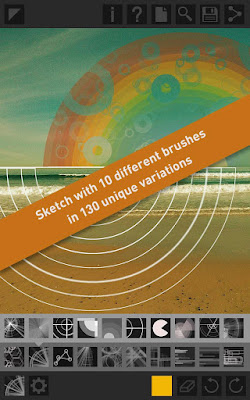
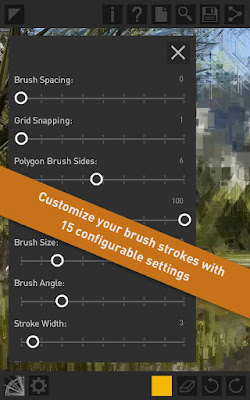
A vast selection of unique shape emitting brushes that includes customizable settings allowing creative manipulation of the flow, opacity, size, and angle of your draw strokes with various unique controls. Use one of the 130 presets or customize brush settings to suit your own tastes.
Simple enough for the mobile creator but with advanced tools for the professional designer.
Mobile artistry for the geometrically obsessed.
Features:
◙ Enhance your photos with amazing geometric effects and patterns
◙ Sketch with 10 different brush types in 130 different variations
◙ Customize your brush strokes with 15 configurable settings
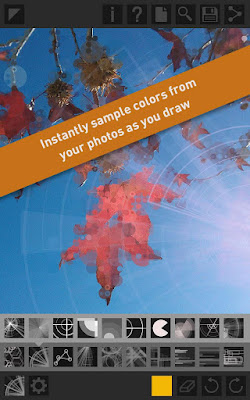
◙ Instantly apply color extracted from your photo to the geometry being drawn
◙ Sketch on a blank canvas to produce your own creation
◙ Output up to 8mp ( 2448 x 3264 ) for high-resolution printing capabilities
◙ In-app sharing to Facebook, Twitter and email in iOS 6
◙ Zoom, pan, undo and redo capabilities for precise creation
What’s in this version :
◙ Added support for Galaxy S4 and other 1080p devices

If you face any problem to download, please inform us by comment .
Here is the link for Download...................
DOWNLOAD>>

Ninja SMS V1.5.2 apk
Requires Android:2.2 and up| 1.3 MB |
Tired of having to switch windows or pause videos just to answer an incoming message?
Ninja SMS :
Ninja SMS enables true multitasking by allowing you to read and reply to incoming messages without ever leaving your current screen.
Ninja SMS Features:
• Multiple floating windows at the same time
• Drag and drop windows anywhere with ease
• Collapse mode helps minimize popups for easy access anytime
• Notification animation for new incoming messages in minimized chat windows
• Maximize mode allows you to switch to full texting mode in an instant
• Transparency mode to help you view other windows in the background as you read and
reply to messages
• Settings panel lets you control which contacts the app will show popups for
• 1 easy switch to enable and disable anytime
• Efficient battery usage so you can keep the popups open as long as you want
• Elegant design and graphics
Ninja SMS lets you have similar popup features as Facebook’s new “Chat Heads” feature without needing to replace your current launcher. Plus, we support all phones 2.2+ already (including HD devices such as Samsung Galaxy S 4, Sony Z, HTC One X etc.)
With your support we’re planning on providing many more features in the future:
• Custom themes and colors for popup windows
• MMS and file transfer support
• Facebook messaging integration
NOTE:
• Ninja SMS uses your phone carrier’s normal SMS plan to send messages. Check with your
phone carrier for their price offerings
What’s in this version :
• Bug fix: now you can use compose with choose all contacts
• Compose feature within the app. Yay!
• Quick compose homescreen widget. Add a widget for any contact and start chatting
right away… ninja style!
• Call contact directly from the ninja popup by tapping on the contact photo (requires an
extra permission to allow us to initiate the call for you if you wish)
• General bug fixes and improvements
DOWNLOAD>>


