

Ultra Keyboard 7.0 APK
Requires Android: 1.6 and up | 5.2 MB |
Ultra Keyboard is an advanced touch-screen keyboard!
Ultra Keyboard:
Ultra Keyboard is an advanced touch-screen keyboard, with many features geared towards giving you a better Android keyboard experience.TOOL BAR
Ultra's tool bar provides a ton of features in a tight space. Flick the tool bar left or right to scroll through the available buttons. Quickly change many settings, navigate through text, cut and paste, change dictionaries, change themes, insert emoticons, and more. Show or hide the tool bar by pressing your device's menu button.
CUSTOM THEMES
Ultra supports many keyboard themes available from the market, both free and paid. Quickly switch between themes using the tool bar. You can also use Ultra's built-in theme editor to create your own themes, or edit existing ones. Don't like a theme's font? Change it!
SUGGESTIONS
Like most keyboards, Ultra suggests words while you type. The suggestions box is designed to be smart, fast, and easy to use, with many unique features. Add custom words to your personal dictionary. Long-press a word, and you can black-list it so it doesn't show up in the suggestions.
MULTIPLE LANGUAGES
Ultra comes with a built-in English language dictionary, but there are other dictionaries available that you can download right from the keyboard.
WORD REPLACEMENTS
Type "brb" to quickly type "be right back". There are many built-in replacements, and you can add your own.
DYNAMIC UI
Ultra can combine keys so they're easier to press, similar to Blackberry™ phones. For devices that don't have a track pad or built-in navigation, there are arrow keys that let you quickly move the cursor. Easily make the keys taller or shorter.
MULTI-TOUCH SUPPORT
For devices with multi-touch-capable screens, you can press multiple keys at once. Quickly enter a capital letter by sliding your finger from the shift key. Slide your finger from the view key to enter numbers or symbols.
SECONDARY CHARACTERS
You won't have to change views just to enter a single number. Hold down certain keys to quickly access secondary and hidden characters.
WORD TRACING
Have you heard of that popular keyboard that lets you swipe your finger over words, instead of typing each letter? Ultra can do that too.
SPEECH-TO-TEXT
Speak to Ultra Keyboard. It uses Google's web-based service to transform your spoken words (and punctuation) into text.
TRANSLATION
Quickly translate your text to dozens of languages.
CAMERA MODE
Activate your camera to see where you're going while you text your friends.
CUSTOMIZABLE SETTINGS
Almost everything in Ultra is customizable. Want to show more suggestions? You can. Don't use a few of the tool bar buttons? Remove them.
What's in this version : (Updated : Sep 1, 2013)
• Additions:
• Full-screen mode
• New tracing animation
• Physical key actions
• Improved camera mode (with front-facing support)
• New theme styles
• Fixes:
• Got rid of HUGE memory leak. Memory usage will be much lower now.
• Many crash fixes.
• LOTS MORE! Way too many to list here.
Here is the link for Download...............
DOWNLOAD>>

Easy Uninstaller Pro - Clean v2.2.2 APK
Requires Android: 2.2 and up | 225 KB |
Simplist & fastest uninstall tool for android.
Easy Uninstaller Pro:
Easy & fastest uninstall tool.Easy Uninstaller is a tool to uninstall apps for android phones. It is quit easy to use, you can select multiple apps that you want to uninstall, and click "Uninstall Selected Apps" button to uninstall them. Easy Uninstaller also support app search & sort.
Type the keyword in the textbox in the top to search the app that you want to uninstall. Click "Menu"->"Sort" to sort the apps in many sort types. Long click on specified app, you will get a poped up context menu to provide more options. You can view app details by click "Application Details", you can share app by click "Share", and you can search the app in the google market by click "Search in Google Market".
Easy Uninstaller Pro Features:
• Batch uninstall• Fast uninstall by one click
• Show app name,version,update time,size
• Search app by name
• Various sort mode
• App share
• Search in Google Market
• AD free
• Easy Uninstaller cannot uninstall pre-installed apps in the system because it is limited by
the system machenism.
What's in this version : (Updated : Aug 31, 2013)
• Uninstall history
• Uninstall reminder
• Change language
Here is the link for Download.................
DOWNLOAD>>

Runtastic PRO v4.1.1 APK
Requires Android: 2.1 and up | 10 MB |
Your personal tracking app for running, biking and other sports activities !
Runtastic PRO:
The runtastic sportcoach uses the built-in GPS to map your activities and track your progress (distance, time, speed, calories, altitude, pace, etc.). Show your friends how active you are and share your success with them.Runtastic PRO Features :
• Voice feedback during a workout: Get audio feedback for each mile or kilometer• Live tracking: Show your friends and family where you are
• Cheering: Hear cheers and receive messages live from your friends and be motivated to go even further
• Heart rate support: Polar Wearlink+ Bluetooth and Zephyr heart rate monitor
Split table with dynamic mile and kilometer split
• Calorie goal: Set a specific calorie goal and use the voice feedback to reach your workout goal
• Pace goal: Define your favorite pace
• Geotagging: Take pictures during a workout and see these pictures online at your map trace
• Weather and Temperature: Receive live weather information and save weather data automatically after a workout
• Prediction of sunset and sunrise
Features :
• Map your workouts in real-time with built-in GPS and monitor your progress (time, distance, speed, pace, calories, altitude, etc.)
• Personal workout diary and metrics
• Mapping: Detailed live mapping and historic mapping of previous sessions (Google maps)
• Dashboard configuration: Display preferred statistics
• Graphs: Get charts with altitude, pace, speed and heart rate information
• Performance analysis with lap times
• Enjoy your workouts with the integrated music player
• Set goals for time and distance
• Accurate calculation of elevation gain and loss
• Manual entry of workouts: Add treadmill, spinning and weightlifting workouts
• Monthly and overall metrics for distance, number of workouts, duration and calories
• Share your success on Facebook and Twitter
You can save all your workouts at www.runtastic.com. Using the online community you’ll get further analysis, metrics and comparisons to your friends. Additionally, you can choose a training plan and track your body statistics. Share all your workouts easily with the facebook and twitter connect.
What's in this version: (Updated : Aug 31, 2013)
• Connect your Pebble Watch
• Control the app and see session data directly on your wrist
• New Design
• Runtastic is now lighter, simpler & more elegant for you
• Heart Rate via Bluetooth Smart
• Connect a Runtastic Heart Rate Monitor via energy-efficient Bluetooth Smart
• Improved Structure
• Access features & screens effortlessly with the new drawer navigation
• New Maps
• Maps are now 3D: Adjust your viewpoint to show map with perspective
Here is the link for Download...............
DOWNLOAD>>
Weather Live with Widgets v1.7.2 APK
Requires Android: 2.3.3 and up | 24 MB |
Turn your device into a beautiful weather station!
Weather Live:
Introducing Weather Live. The most beautiful weather app. Ever.Don't let bad weather take you by surprise! Whether it is cloudy, rainy, snowy or even stormy outside, Weather Live will provide you with current weather conditions and forecast in your city and multiple locations all around the world.
Cold or warm weather, it will magically come alive on the crisp screen of your device. You won’t even have to look out the window as Weather Live will make you feel like you are already outside! With an innovative technology Weather Live implemented into the app, we made it possible!
Weather Live Features:
• Weather forecasts for multiple locations all around the world• Live weather scenes reflecting real-time weather conditions
• Local time in 12 or 24-hour format
• Customizable layout: all weather details, short-term forecast, long-term forecast,
current state only, text only
• 7-day and 24-hour weather forecast
• "Feels Like" temperature. Today’s Min and Max
• Wind direction and speed. Visibility details
• Humidity and precipitation information. Pressure in inches, mm or mbar
• Fahrenheit or Celsius and Miles or Kilometers
• Easy navigation between cities: swipe either to the left or to the right to switch
between locations
• Get Weather Live and be prepared for any weather!
What's in this version : (Updated : Aug 30, 2013)
• Performance and stability improvements
Here is the link for Download.................
DOWNLOAD>>

Next Launcher 3D v2.0 APK
Next Launcher, designed by GO Dev Team, is officially released now!
Requires Android: 2.2 and up | 5.8 MB |
Next Launcher 3D :
Next Launcher is a new launcher application which is full of glorious 3D elements and dynamic effects. Fancy 3D visual elements, gorgeous transition effects and humanized gestures bring you a unique and splendid operation experience and visual enjoyment.Next Launcher 3D Features:
• Various operation for icons: icons support rotation, reset, select, align and so on.Operation is easy and fantastic.
• Unlimited screen layout: placing icons or widgets randomly which forms your own home
screen.
• Stereoscopic screen preview: lots of screen display effects, dazzling animation of
screen switching about adding or deleting screen.
• Quick screen management: adding different kinds of elements in screen edit including
application icons, folders and widgets. It’ll support changing wallpapers and themes
soon.
• Rotatable dock: inverting upward or downward the Dock can quickly switch among
home screen, screen edit and screen preview.
• Powerful app drawer: icons can be arranged by names or by time, and folders can be created by overlaying icons. Batch mode and operation of adding apps to screen are
also available.
• Beautiful scrolling effects: a variety of app drawer scrolling effects that provide a
distinctive screen switching experience.
• Fancy 3D widgets: 3D widgets that are based on Next Launcher are coming soon!
Tips:
• Please make sure your device has installed Google Play.
• Phone performance:Android 2.3.3 and up; Dual-core models is better.
• Suggestion:Watch the video of Next Launcher first, to know about the cool operation
of the product.
Notice: We suggest users which use Galaxy Nexus don't remove the Menu icon.
What's in this version: (Updated : Aug 30, 2013)
• (New) 3D Scene mode Beta (Menu->Preference->Switch to 3D scene mode)
• (Fix) Freezing in some devices
Here is the link for Download........................
DOWNLOAD>>
Sparky Lock Screen v0.99.04 APK
Requires Android: 2.1 and up | 9.7 MB |
We developed some of the most creative and eye-candy Lock Screen themes ever and we kept it simple to use!
Sparky Lock Screen:
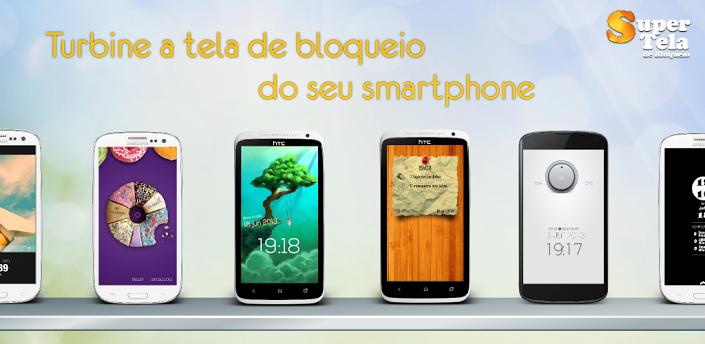
We developed some of the most creative and eye-candy Lock Screen themes ever and we kept it simple to use!Sparky Lock Screen lets you completely change your smartphone Lock Screen!
Sparky Lock Screen Features:
• State of the art themes: design, creativity and usability!• Easy and fast: one touch setup!
• No extra download needed!
• Optimized performance!
• Beta Version: smartphone support only.
What's new in this version : (Updated : Aug 31, 2013)
• Changed Splash Screen.
• Added option to block Home Button!
• Added option to remove icon notification!
• Added New Theme: Classic!
• Added TELEPATHIC UNLOCK :)
• Added New Theme: The Beach!
• Added New Theme: Wise Girl!
Here is the link for Download........................
DOWNLOAD>>

Minuum Keyboard v1.1.2b APK
Requires Android: 2.3.3 and up | 20 MB |
Welcome to Minuum, the little keyboard for big fingers!
Minuum Keyboard:
Minuum is a tiny, one-dimensional keyboard that frees up your screen space while allowing you to type fast and accurately. Type quickly without worrying about being precise, thanks to smart auto-correction.SIMPLIFIED TOUCHSCREEN TYPING
Most existing keyboards take an approach similar to cramming a full typewriter into a touchscreen device. This gives us keyboards that cover up half the usable touchscreen space (or more), obstructing your content. Minuum gives you back your screen space by reducing the standard keyboard to a single dimension.
HOW MINUUM WORKS IN PRACTICE
Minuum re-imagines the keyboard by minimizing a standard layout into a single line, letting you type quickly and accurately without needing large keys. This minimalism is enabled by a specialized auto-correction algorithm that allows highly imprecise typing. These algorithms interpret, in real time, the difference between what you type and what you mean, getting it right even if you miss every single letter.
DISCOVER MORE
The Minuum linear keyboard for touchscreens is just the first step toward a "type anywhere" future. Minuum will let you type on wearable devices like smart watches, game controllers, and more devices of minimum size. By supporting this app, you help to enable that vision.
MINUUM KEYBOARD FEATURES AT A GLANCE
MORE SCREEN SPACE
Recover more than half of the usable touchscreen space you lose when typing on traditional virtual keyboards.
FAST SLOPPY TYPING
Type fast without worrying about being precise, thanks to smart auto-correction.
LARGE-FINGER FRIENDLY
Use key magnification through a zoom view for precise entry of letters, numbers, and punctuation—especially useful if you have large fingers.
FAMILIAR KEYBOARD LAYOUT
You already know how to type with Minuum—it’s just the QWERTY layout, minimized.
DIFFERENT ALPHABET ARRANGEMENTS
Choose from alternate keyboard layouts—such as “QWERTZ,” “AZERTY,” “A-Z.”
FULL FUNCTIONALITY
Get everything you’d expect in a keyboard (such as, punctuation, space, backspace, and enter) without losing your screen space.
EXPANSION TO FULL-SIZED KEYBOARD
Press with two fingers on the keyboard to switch between mini and full-sized modes (useful for URLs and passwords).
SMART WORD PREDICTION
Speed up your typing by choosing from suggestions made by a predictive engine that learns from you based on your word list, word combinations, and language use patterns.
VOCABULARY CONTROL
Minuum learns from your vocabulary, and you can delete words from your dictionary though a handy pop-up display.
GESTURE SHORTCUTS
Slide your fingers to the corners for quick, convenient access to all your features via pop-up keys.
LANGUAGE CAPABILITY
Initial beta releases of the Minuum keyboard are English-only, but as we widen the beta test we encourage you to give us feedback at support.minuum.com about adding different languages.
VOICE TYPING
Experience hands-free text entry via Google Voice Typing for voice-to-text typing when performing other activities.
What's in this version : (Updated : Aug 30, 2013)
• Fixed lag issues in Samsung applications
• Improved disambiguator accuracy
• Fixed issues with number fields such as PIN unlock fields, and phone number fields
• More consistent haptic feedback
• Fixed issue where keyboard height could not be configured.
• Option to disable auto-capitalization
Here is the link for Download........................
DOWNLOAD>>
Autorun Manager PRO v4.0 APK
Requires Android: 1.6 and up | 1 MB |
Do you want control over startup apps? Autorun Manager gives it!
Autorun Manager PRO:
Autorun Manager (formerly Autorun Killer) is an ultimate tool that lets you disable all the autostarting apps you don't need. Unfortunately this app is misunderstood many times so please read help carefully and/or mail the developer if you have questions.There are many applications that automatically start when you turn on your device; many of these you don't use or need, they just consume your valuable resources. This app sports a basic mode for the regular users and an advanced mode for power users with rooted devices.
Autorun Manager in basic mode lets you manage applications that start up when you boot your device. Applications are terminated right after they start, but if the application is programmed to restart itself this can fail. Please note that some applications are written so that they cannot be stopped because of the android system design. These kind of applications are marked as 'self-restarter' and are better to be left enabled.
In advanced mode you gain control over all the system-wide events and enable-disable application starts. This is the ultimate solution to control what you want to be started, but you also can break apps, so this feature is only for experienced users with rooted devices.
Autorun Manager PRO features:
• no ads• basic mode's prevent restart feature is selectable
• can block more than 4 receivers in advanced mode
• Chuck Norris mode enabled
What's in this version : (Updated : jan 2, 2013)
• speed improvements
• disable all receivers of an app from context menu
• application freezing (PRO only)
• number of disabled receivers is raised to 10 for free users
• you can now select in preferences to directly start with advanced/basic mode
• searchable list in advanced/basic (search for app name or receiver)
• improved and fast filtering
• updated UI
• improved root handling
• fixed row expanding
• updated libraries
• better and faster pro key handling
• added EULA
Here is the link for Download........................
DOWNLOAD>>
Instructions :
• Copy 3 files in Autorun Manager PRO v1.5 TB RAR to Titaniumbackup folder > Restore
'App+Data'
• Download PRO TB 1.5
• Install Autorun Manager v4.0
• Download Autorun Manager v4.0

Apex Launcher Pro v2.0.6 APK
Requires Android: 4.0 and up | 3 MB |
Powerful, fast, and highly customizable home replacement for Android 4.0+!
Apex Launcher Pro:
Powerful, fast, and highly customizable home replacement for Android 4.0+.Apex Launcher helps you create a customized homescreen experience on your Ice Cream Sandwich (Android 4.0) device.
Apex Launcher Features:
• Customizable homescreen grid size and up to 9 homescreens• Scrollable dock with up to 7 icons per page and up to 5 pages
• Infinite & elastic scrolling (homescreen, drawer and dock)
• Fancy transition effects (tablet, cube, etc.)
• Hide elements as you want (persistent search bar, status bar, or even the dock)
• Customizable icons and labels for shortcuts and folders
• Choose different folder preview styles and background
• Multiple drawer styles (transparent/opaque, horizontal/vertical, paginated/continuous)
• Drawer apps sorting (title, install date, mostly used)
• Hide apps from the drawer
• Lock your desktop to prevent accidental changes
• Enjoy homescreen gestures (pinch, swipe up/down, double tap)
• Advanced theme engine (icon packs, skins, etc.)
• Backup/restore settings and data
• Optimized for both phones and tablets
• Lots of other customization options!
Pro Features:
• Multiple configurable drawer tabs
• Unread count notifications
• Dock swipe gestures
• Two finger gestures
• More transition effects
• ADW, LauncherPro, and Go Launcher theme support
• Batch add option for folders
• Option to merge folder contents
• Widgets in dock (1x1 only)
• Overlapping widgets
More features on the way!
Note:
Due to limitations of the Android framework, you won't be able to add widgets from the app drawer without root access. If your device is rooted, please enable the Root Helper via Settings > Advanced settings > Enable Root Helper.
Tips:
• Pinch the screen to access screen previews (like Exposé or HTC Sense).
• Long press an icon to drag and drop it over another one to create a folder.
• Long press icons/folders on the desktop and choose edit from the popup menu
to customize icons and labels.
• Drag, hover, and drop app icons over the delete button at the top of the screen to
quickly uninstall apps.
• Long press an app in the hide apps list to quickly launch that app.
• Switch to single screen wallpaper mode to fix wallpaper zooming issues.
• Enable the Root Helper in advanced settings (root required) to add widgets from the
drawer.
What's in this version : (Updated : Jul 30, 2013)
• Fixed search bar style in Android 4.3
• Fixed folder label alignment issue* Updated translations
• Fixed drawer folder bug
• Ongoing notification when keep in memory is enabled (Android 4.3)
• Fixed FC on Android 4.3
• Various bugfixes
• Updated translations
Here is the link for Download................
DOWNLOAD>>

Dr.Web Anti-virus (Life License) v7.00.0 APK
Requires Android: 1.6 and up | 1.5 MB |
Comprehensive protection from viruses, spam and dangerous sites!!
Dr.Web Anti-virus (Life License):
Protect your mobile device from viruses and spam with a popular anti-virus from leading Russian anti-virus vendor Doctor Web, whose acclaimed products first appeared on the market in 1992.Dr.Web anti-virus provides you and your mobile device with the constant anti-virus protection, the intelligent SMS and calls filtering and the tools to find your device in case it is lost or to defeat thieves in case it is stolen.
The application does not affect the operating system performance, and — more important — does not reduce the battery life. You can use simple and handy desktop widgets to access the application.
Dr.Web anti-virus uses the unique algorithm to detect malware – Origins Tracing™ for Android – which allows detecting the new virus families using the knowledge database on previous threats. A unique record is created for each malicious program and describes the behavior algorithm of this sample. This provides the efficiency of detecting new modifications of the whole virus family and significantly reduces the size of virus databases.
Dr.Web Anti-virus Features:
• Constant anti-virus protection and threats neutralization. The anti-virus check of the filesystem is carried out by file monitor SpIDer Guard, which scans in the real-time mode all
the files being saved in the device memory.
• On demand scanning is carried out by a specific component – scanner. Dr.Web anti-virus
allows to perform quick and full scan of the file system or scan only critical files and
folders.
• Quarantine. The detected threats can be deleted or moved to quarantine, where you
can review the detailed information on the potential malware.
• SD-card protection from contamination by autorun files and Exploit.Cpllnk, which
represent a threat to Windows.
• The small size of updates for virus databases allows to save the traffic and your money if
you are using the limited mobile tariffs.
• Detailed statistics on the anti-virus operation.
• Two handy widgets to choose from to manage the anti-virus protection (sizes 1х1 and
4х1).
Anti-spam
• Selection of calls and SMS filtering modes.
• Creation of your own filtering profiles.
• Black list editing. You can add the contacts, from which you would like to block all
incoming calls and SMS, into the black list.
• Viewing blocked calls and SMS.
Anti-theft
• Anti-theft helps to find the mobile device in case it is lost or stolen as well as remotely delete all personal information from it. Anti-theft can be managed by sending special SMS to the device.
Anti-theft allows:
• to enable the device blocking function on its restart
• to block the device and require entering the password to unlock it
• to limit the number of errors on entering the password to unlock the device
• to unlock the device by sending an SMS-command
• to get the GPS-coordinates of the device as a link to Google Maps
• to remotely delete the information stored on the SD-card
• to activate a sound alert on the device and to block the screen
• to enter your own text which will be displayed on the blocked screen
• to create a list of friends, who will receive notifications on changing the SIM-card on
your device. You will be able to manage Anti-theft and to unlock the device from
their numbers in case you forgot your password.
URL filter Cloud Checker
The filter Cloud Checker protects the user of the mobile device with the default Android browser from the undesirable Internet resources. It can be configured to block all not recommended and potentially dangerous web sites or only certain categories:
• Drugs
• Known virus sources
• Obscene language
• Terrorism
• Violence
• Weapon
• Adult content, etc.
Attention: In case Dr.Web Anti-theft is enabled on your device, you need to clear the Dr.Web anti-virus checkbox on the Location and Security tab of the Select device administrator section in device settings before uninstalling the application.
What's in this version : (Updated : Jul 3, 2012)
• Cloud Checker Functionality has been added.
• Registration of Anti-thief on the server has been added to provide automatically
sending password to e-mail.
• Option to disable Anti-thief has been added.
• Sending information about false action and suspicion of virus to Doctor Web laboratory
has been added.
• Text set by user to contact him is now shown on all lock screens.
• Bug fixes.
Here is the link for Download........................
DOWNLOAD>>
Ultimate iOS7 Theme v1.81 APK
Requires Android:4.0 and up | 12 MB |
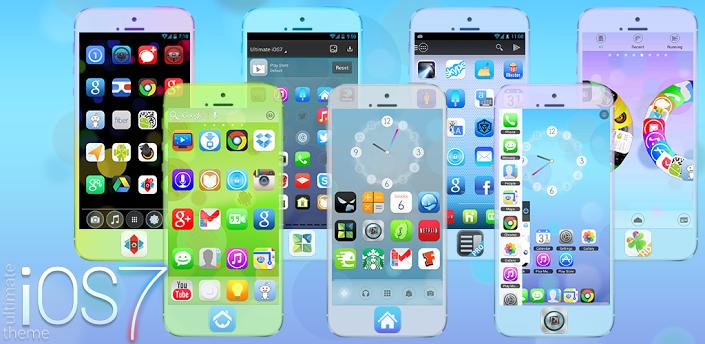
Ultimate iOS7 Theme is a brand new theme for Apex Launcher, Nova Launcher, SS Launcher, and other supporting home screen / launcher apps!
Ultimate iOS7 Theme:
Theme your Android device with the latest Ultimate iOS7 style, shock your iPhone or iPad friends / enemies with a fully custom theme inspired by the forthcoming Apple mobile Operating System!This is the ELITE (ad-free) version!
Ultimate iOS7 Theme Features:
• Ultimate iOS7 Icon Pack - Individually styled iOS inspired icon pack, featuring over 185+meticulously designed Ultimate iOS 7 style icons.
• Bonus Holo-Apple Style Icons - Exclusive icon pack also includes Apple Holo style icons
designed for use with the dock bar!
• Ultimate iOS7 Wallpaper Pack - Exclusive custom designed wallpaper pack with custom
designs inspired by the latest flagship iOS 7 styles. Built-in wallpaper picker, simply
press Menu > Wallpapers > Scroll to Ultimate iOS7 > Set wallpaper to switch.
• Full HD Support - Full graphics support for tablets and larger devices, featuring largest
XX-HDPI icon pack and wallpaper set.
• Full Apex Launcher Graphics Support - All supporting graphics for Apex Launcher,
including custom settings icons, tabs and dock bars, and much more!
• Theme Your Whole Device - Matching Ultimate iOS7 messenger theme for GO SMS Pro
also available here in the Google Play store: http://goo.gl/RaBlT
DIRECTIONS & INSTRUCTIONS:
• This is a theme (like a skin), you must apply it using Apex Launcher or Nova Launcher or
other supporting home screen apps.
To apply full theme using Apex Launcher:
• Open Apex Launcher > Press Menu (or Apex Settings) > Theme settings > Scroll to
Ultimate iOS7 Theme > Apply
To apply theme using Nova Launcher:
• Open Nova Launcher > Press Menu > Nova Settings > Look and feel > Icon Theme >
Ultimate iOS7 Theme
To change wallpaper:
• Press Menu > Wallpapers > Scroll to Ultimate iOS7 Wallpapers > Set wallpapers
What's in this version : (Updated : Jul 13, 2013)
• Added new icon requests, now over 480+ Ultimate iOS7 icons included with more coming
soon!
• Exclusive 'Candy Red Shine', 'Electric Blue' and 'Hot Pink' versions now available
on Google Play.
Here is the link for Download...................
DOWNLOAD>>

ssLauncher the Original v1.11.10 APK
Requires Android:2.2 and up | 1.2 MB |
More freedom to your device !
ssLauncher the Original:
More freedom to your device!'ssLauncher the Original' is implementing all features of ssLauncher(free version). Additionally, this includes more features, some of which will be applied to the free version with approximately monthly intervals.
ssLauncher Features :
• all of ssLauncher
• copy & paste of shortcuts• crop icons and images
• additional page transition animations
• support folder in application drawer (planned) (*)
What's in this version: (Updated : Jun 13, 2013)
• the 'scroll wallpaper' option works perfectly when using a live wallpaper
• fixed the bug that some shortcuts and widgets are disappeared on some devices
• enabled multi-line when editing text for shortcuts
• fixed some bugs and optimized
• added the option to use the 'legacy widget picker'
• fixed some bugs and optimized
Here is the link for Download........................
DOWNLOAD>>


